Images to HEIC Converter
Convert JPG and PNG images to HEIC format online for free. Fast and secure image to HEIC converter for smaller file size and high image quality.
YOUR AD GOES HERE
YOUR AD GOES HERE
Image to HEIC Converter Online: Convert Images to HEIC Format Free
With the rise of modern smartphones and high-resolution photography, image file sizes have increased significantly. Traditional formats like JPG and PNG work well, but they are not always efficient when it comes to storage and performance. This is where HEIC (High Efficiency Image Container) format becomes important.
If you are searching for an image to HEIC converter, it usually means you want to reduce image file size while maintaining high visual quality. An image to HEIC converter online allows you to convert standard images into HEIC format directly from your browser, without installing any software.
In this detailed guide, you will learn what HEIC format is, why it is useful, how image to HEIC conversion works, and how to use the image to HEIC converter available on pdfimageextractor.info effectively.
What Is an Image to HEIC Converter?
An image to HEIC converter is a tool that converts common image formats such as JPG, PNG, or BMP into HEIC format. HEIC is based on advanced compression technology and stores images more efficiently than older formats. It delivers high image quality at much smaller file sizes, making it ideal for modern devices and storage-optimized workflows. Online HEIC converters simplify this process by handling encoding automatically, so users do not need technical knowledge.
Understanding the HEIC (High Efficiency Image Container) Format
HEIC stands for High Efficiency Image file format. It is a modern image format developed by the MPEG group and widely used by Apple devices.
HEIC images are known for:
-
Smaller file sizes
-
High image quality
-
Support for transparency
-
Better color depth
-
Efficient storage
Because of these features, HEIC is commonly used on iPhones, iPads, and modern operating systems.
Why Convert Images to HEIC Format?
There are several practical reasons to convert images to HEIC. One major reason is storage efficiency. HEIC images can be up to 50% smaller than JPG images without noticeable quality loss. Another reason is performance. Smaller image files load faster and are easier to manage, especially on mobile devices. HEIC format is also useful for cloud storage, photo backups, and modern image workflows where efficiency matters.
Image to HEIC Converter Online – Why It Is Useful
An image to HEIC converter online removes the need for specialized image-editing software. Earlier, converting images to HEIC required command-line tools or advanced applications. Online converters make HEIC conversion accessible to everyone.
This is especially useful for:
-
iPhone users
-
Photographers
-
Content creators
-
Students
-
Casual users
All through a simple browser-based interface.
How Image to HEIC Conversion Works
When you upload an image to an image to HEIC converter, the tool analyzes the image data and applies advanced compression algorithms. The converter optimizes color information and removes unnecessary data while preserving visual quality. The processed image is then saved as a HEIC file. The result is a high-quality image with a significantly reduced file size.
Step-by-Step: How to Convert Image to HEIC Online
Using an image to HEIC converter online is very simple.
1. First, click on browse file button.
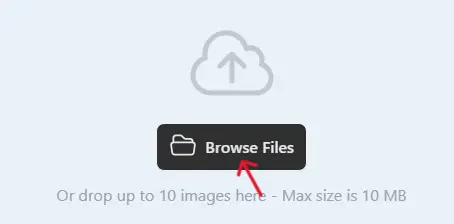
2 .Next, select one or multiple images you want to convert.
3. Click on the Convert button when the uploading process is complete.

4. Once completed, download the WebP images and use them on your website.

Best Practices for High-Quality HEIC Conversion
For best results, start with a high-quality source image. Avoid converting images that are already heavily compressed. If you plan to use HEIC images across different platforms, test compatibility to ensure proper display. Always preview the converted HEIC file to confirm color accuracy and sharpness.
Is Image to HEIC Converter Online Safe?
A reliable image to HEIC converter should:
-
Use HTTPS encryption
-
Not store uploaded images permanently
-
Automatically delete files after conversion
-
Not require account registration
Always review the privacy policy before uploading sensitive images.
Why Use PDFImageExtractor Image to HEIC Converter?
The image to HEIC converter available on pdfimageextractor.info is designed for simplicity and speed. It allows users to convert images without installing software or creating accounts. The tool works on desktops, tablets, and mobile devices and integrates with other image utilities on the platform. This makes it suitable for both beginners and advanced users.
Common Issues in Image to HEIC Conversion
Some older systems and applications may not support HEIC format natively. In such cases, users can convert HEIC images back to JPG or PNG when needed. File compatibility is improving rapidly as HEIC adoption increases.
Who Should Use an Image to HEIC Converter?
An image to HEIC converter is useful for:
-
iPhone and iPad users
-
Photographers
-
Bloggers and content creators
-
Students
-
Anyone who wants smaller image files
If storage efficiency and image quality matter, HEIC is an excellent choice.
Conclusion: Convert Images to HEIC Online with Ease
An image to HEIC converter online is a practical solution for converting images into a modern, storage-efficient format. It helps reduce file size while maintaining high visual quality. By using an image to HEIC converter, you can optimize your images for modern devices without complex software.
Tools like the one available on pdfimageextractor.info make HEIC conversion fast, easy, and accessible. If you want efficient image storage with excellent quality, converting images to HEIC is the right move.
More Converters
YOUR AD GOES HERE