Images to PDF Converter
Image to PDF converter is a useful tool that allows you to convert images to PDF format
YOUR AD GOES HERE
YOUR AD GOES HERE
Image to PDF Converter Online: Convert Images to PDF Free
In today’s digital workflow, images and PDF documents are used everywhere. From students submitting assignments to professionals sharing reports and scanned documents, PDF has become the most trusted file format for sharing information. However, images like JPG or PNG are not always convenient to share, store, or print. This is why many users look for an image to PDF converter.
An image to PDF converter online allows you to convert one or multiple images into a single PDF file directly from your browser. You do not need to install any software or create an account. Tools like the image to PDF converter available on pdfimageextractor.info make the process fast, simple, and reliable.
In this detailed guide, you will learn what an image to PDF converter is, why PDF format is preferred, how image to PDF conversion works, and how to use an online converter efficiently.
What Is an Image to PDF Converter?
An image to PDF converter is a tool that converts image files such as JPG, PNG, BMP, or TIFF into PDF (Portable Document Format). PDF files preserve layout, quality, and formatting across different devices and operating systems. When images are converted into PDF, they become easier to share, print, and archive. Online image to PDF converters automate this process and remove the need for desktop software.
Understanding the PDF File Format
PDF stands for Portable Document Format. It was developed to ensure documents look the same on every device.
PDF files are popular because they:
-
Preserve layout and quality
-
Are widely supported
-
Are easy to share
-
Are suitable for printing and archiving
Because of these features, PDF is the preferred format for official documents, forms, reports, and scanned files.
Why Convert Images to PDF Format?
There are several reasons why converting images to PDF is useful. One major reason is professional presentation. A PDF looks more organized and formal than individual image files. Another reason is easy sharing. Multiple images can be combined into a single PDF file, making it easier to send via email or upload online. PDF files are also better for printing, as they maintain consistent layout and resolution.
Image to PDF Converter Online – Why It Is Useful
An image to PDF converter online eliminates the need for paid software like Adobe Acrobat. Earlier, users had to rely on scanners or desktop tools to create PDFs from images. Online converters simplify this process and make it accessible to everyone.
This is especially helpful for:
-
Students
-
Office workers
-
Teachers
-
Business professionals
-
Freelancers
All conversions can be done directly in a web browser.
How Image to PDF Conversion Works
When you upload images to an image to PDF converter, the tool reads each image file and places it onto PDF pages. The converter maintains image quality and aligns images properly within the PDF layout. Multiple images can be merged into a single PDF document. Once processing is complete, the PDF file is generated and ready for download.
Step-by-Step: How to Convert Image to PDF Online
Using an image to PDF converter online is very simple.
1. First, click on browse file button.
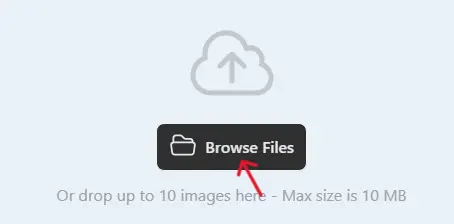
2 .Next, select one or multiple images you want to convert.
3. Click on the Convert button when the uploading process is complete.

4. Once completed, download the WebP images and use them on your website.

Best Practices for Image to PDF Conversion
For best results, use clear and high-resolution images. If converting scanned documents, ensure images are properly aligned and readable. Arrange images in the correct order before conversion, especially when creating multi-page PDFs. Always preview the final PDF to ensure everything looks correct.
Common Use Cases for Image to PDF Conversion
Image to PDF converters are widely used for:
-
Scanned documents
-
Assignment submissions
-
Office reports
-
ID cards and certificates
-
Forms and receipts
PDF format ensures documents remain professional and easy to manage.
Is Image to PDF Converter Online Safe?
A reliable image to PDF converter should:
-
Use HTTPS encryption
-
Not store uploaded files permanently
-
Automatically delete files after conversion
-
Not require account registration
Always check the privacy policy before uploading sensitive documents.
Why Use PDFImageExtractor Image to PDF Converter?
The image to PDF converter available on pdfimageextractor.info is designed for simplicity, speed, and security. It allows users to convert images into PDF without installing software or creating accounts. The tool works across devices and integrates well with other PDF and image utilities on the platform. This makes it suitable for both personal and professional use.
Common Issues in Image to PDF Conversion
Large PDF file size can occur if high-resolution images are used. Compressing images before conversion can help. Incorrect image orientation may happen if images are not properly aligned. Previewing before final download helps avoid this issue.
Who Should Use an Image to PDF Converter?
An image to PDF converter is useful for:
-
Students
-
Teachers
-
Office professionals
-
Freelancers
-
Business owners
Anyone who needs to create clean and shareable documents from images can benefit from this tool.
Conclusion: Convert Images to PDF Online with Ease
An image to PDF converter online is an essential tool for converting images into professional, shareable documents. PDF format offers consistency, compatibility, and ease of use across platforms. By using an online image to PDF converter, you can save time, avoid complex software, and create high-quality PDF files instantly.
Tools like the one available on pdfimageextractor.info make image to PDF conversion fast, simple, and accessible to everyone. If you regularly work with images and documents, converting images to PDF is a smart and practical solution.
More Converters
YOUR AD GOES HERE